
Which option is best for you?
I NEED TO CREATE AN ACCOUNT
Account Application Submission Tips
The account approval process can
take up to 3-business days. Incomplete
applications may cause approval delays.
Please submit a ticket if you have any
questions prior to submitting your application.
If you had an account in the past, or you are unsure if you qualify, please do not submit a new account request. Please submit a ticket instead.
I NEED HELP WITH AN EXISTING ACCOUNT
Forgot Password: If you are unable to login.
To receive password reset link, the account must be active and the email must be in our database. Please submit a ticket if you do not receive an automated response within 5 minutes.
Change Password: Must be logged in and know your existing password.
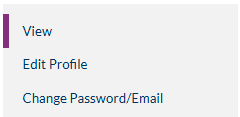
Click on the "Change Password" section on your user dashboard to the right of your screen.
Screenshot of the menu to View Profile, Edit Profile, and Change Email/Password below:
MICMT Help Assistant: Frequently Asked Questions (FAQs)
Detailed assistance for digital accessibility resources, login, password changes, webinars, courses, and user dashboard questions.